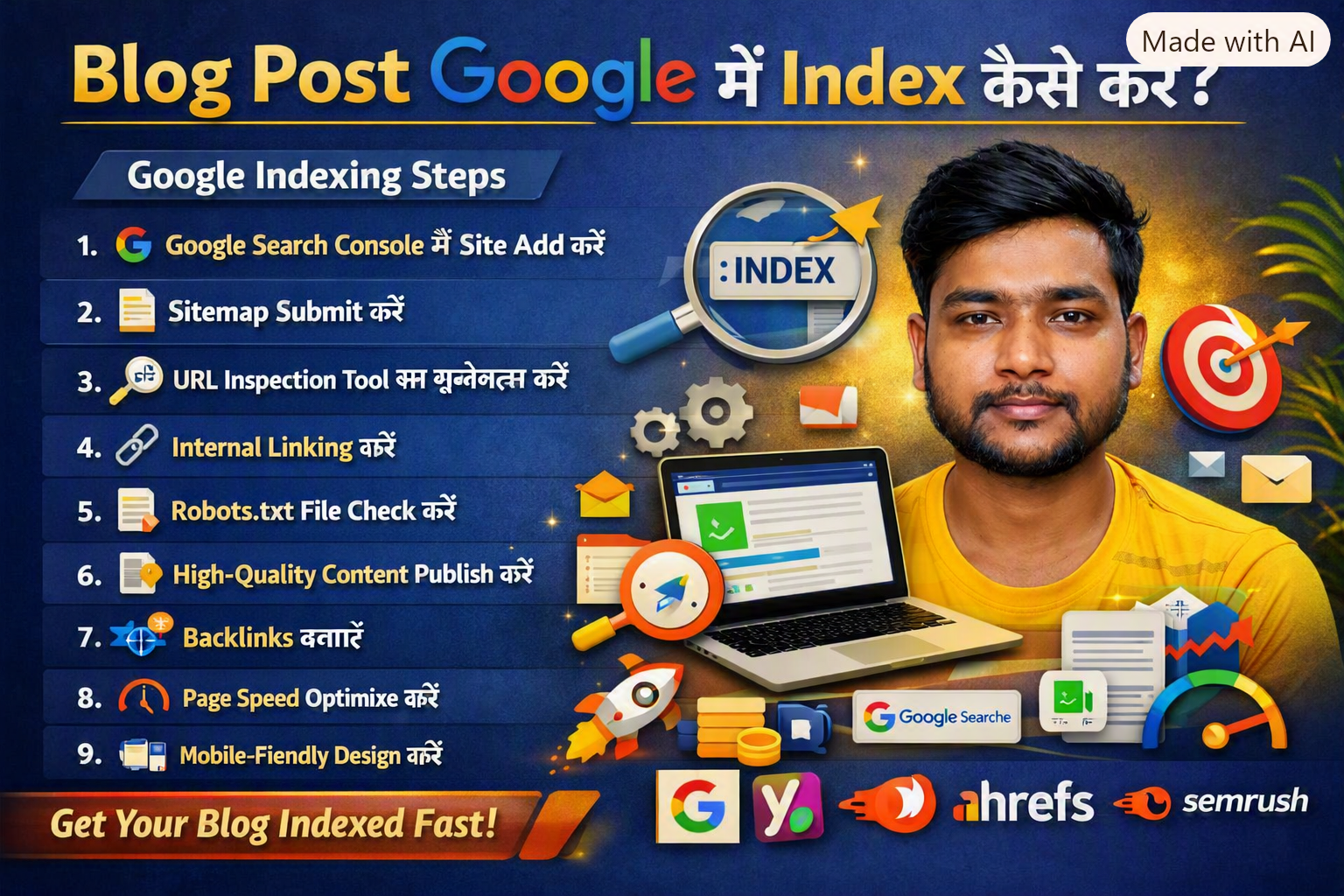
google search console indexing 2026: अगर आपने नया ब्लॉग पोस्ट लिखा है और चाहते हैं कि वह Google Search में जल्दी दिखाई दे, तो आपको उसे Google में Index करवाना होगा। Indexing का मतलब है — Google आपके पेज को अपने database में जोड़ता है ताकि वह search results में दिख सके।
🔍 Google Indexing क्या होती है?
google search console indexing 2026: जब आप कोई नया ब्लॉग publish करते हैं, तो Google के bots (जिसे Google Crawlers या Googlebot कहा जाता है) आपकी वेबसाइट को crawl करते हैं। अगर आपका पेज crawl होकर Google के database में add हो जाता है, तो उसे indexed page कहा जाता है।
Simple Words में: Indexing = आपका ब्लॉग Google Search में दिखाई देने की प्रक्रिया।
🎯 Blog Indexing क्यों जरूरी है?
- Search Visibility बढ़ाने के लिए Index होने के बाद आपका ब्लॉग Google Search में दिखता है।
- Organic Traffic पाने के लिए Indexed pages ही search results में आते हैं।
- SEO Performance Improve करने के लिए Google आपके content को analyze करके rank करता है।
🧩 Blog Post को Google में Index करने के 10 Step‑by‑Step तरीके
🪄 Step 1: Google Search Console में Website Add करें
google search console indexing 2026: सबसे पहले अपनी वेबसाइट को Google Search Console में add करें। यह Google का free tool है जो आपकी site की indexing और performance दिखाता है।
🔹 Google Search Console
👉 Google Search Console (search.google.com in Bing) यहाँ आप अपनी site verify कर सकते हैं और sitemap submit कर सकते हैं।
⚙️ Step 2: Sitemap Submit करें
google-search-console-indexing-2026: Sitemap आपकी वेबसाइट का map होता है जो Google को बताता है कि कौन‑कौन से pages मौजूद हैं। WordPress users Yoast या Rank Math plugin से sitemap बना सकते हैं।
🔹 Yoast SEO Plugin
👉 Yoast SEO (yoast.com in Bing) Yoast automatically sitemap generate करता है और उसे Search Console में submit करने में मदद करता है।
🧠 Step 3: URL Inspection Tool का इस्तेमाल करें
Google Search Console में “URL Inspection” feature होता है। यह आपको बताता है कि आपका page indexed है या नहीं। अगर नहीं है, तो “Request Indexing” पर click करें।
🔹 Google Search Central
👉 Google Search Central (developers.google.com in Bing) यहाँ आप indexing process और URL inspection के बारे में official documentation पढ़ सकते हैं।
🧩 Step 4: Internal Linking करें
google search console indexing 2026: Internal links Google bots को आपकी site structure समझने में मदद करते हैं। जब आप नए ब्लॉग को पुराने relevant articles से link करते हैं, तो Google उसे जल्दी crawl करता है।
🔹 Ahrefs Internal Linking Guide
👉 Ahrefs Internal Linking Guide (ahrefs.com in Bing) Ahrefs बताता है कि internal linking SEO और indexing दोनों के लिए जरूरी है।
🧩 Step 5: Robots.txt File Check करें
google search console indexing 2026: Robots.txt file Google bots को बताती है कि कौन‑से pages crawl करने हैं और कौन‑से नहीं। अगर आपने गलती से “Disallow” लगा दिया है, तो Google आपका page index नहीं करेगा।
🔹 Google Robots.txt Guide
👉 Robots.txt Guide (developers.google.com in Bing)
🧩 Step 6: High‑Quality Content Publish करें
google search console indexing 2026: Google helpful और original content को जल्दी index करता है। Duplicate या thin content को ignore किया जा सकता है।
🔹 Google Helpful Content Guidelines
👉 Helpful Content Guidelines (developers.google.com in Bing)
🧩 Step 7: Backlinks बनाएं
High‑authority websites से backlinks मिलने पर Google आपके page को जल्दी crawl करता है। Backlinks आपकी credibility बढ़ाते हैं।
🔹 Semrush Backlink Analytics
👉 Semrush Backlink Analytics (semrush.com in Bing)
🧩 Step 8: Page Speed Optimize करें
google search console indexing 2026: Slow websites को Google crawl करने में ज्यादा समय लगता है। Page speed improve करने के लिए caching, image compression और CDN का इस्तेमाल करें।
🔹 PageSpeed Insights
👉 Google PageSpeed Insights (pagespeed.web.dev in Bing)
🧩 Step 9: Mobile‑Friendly Design रखें
Google mobile‑first indexing करता है। इसलिए आपकी site responsive और mobile‑friendly होनी चाहिए।
🔹 Google Mobile‑Friendly Test
👉 Mobile‑Friendly Test (search.google.com in Bing)
🧩 Step 10: Regularly Update करें
Google updated content को ज्यादा prefer करता है। पुराने articles को review करें, नए data add करें और broken links fix करें।
🧾 Blog Indexing के लिए Useful Checklist
☑ Website Search Console में add की है ☑ Sitemap submit किया है ☑ URL inspection किया है ☑ Robots.txt सही है ☑ Internal links लगाए हैं ☑ Content original और helpful है ☑ Backlinks बनाए हैं ☑ Page speed optimize किया है ☑ Mobile‑friendly design है ☑ Regular updates किए हैं
💡 Bonus Tip: Indexing Fast करने के Tricks
- Social media पर link share करें
- Ping tools का इस्तेमाल करें
- RSS feed active रखें
- Comment backlinks बनाएं
- Google News में site submit करें
🔚 Conclusion
google search console indexing 2026: Blog post को Google में index करवाना कोई मुश्किल काम नहीं है। बस आपको सही steps follow करने हैं — Search Console में site add करें, sitemap submit करें, internal linking करें और high‑quality content publish करें। Google helpful content को हमेशा priority देता है।
google search console indexing 2026: “Indexing SEO की पहली सीढ़ी है — इसे सही तरीके से करें और आपका ब्लॉग Google पर चमकेगा।”Contact UsTerms & ConditionsPrivacy PolicyDisclaimerAbout Us